
Requirements
To pay with PayPal, you need:- A PayPal account (free to create), or a credit/debit card you can use on PayPal’s guest checkout
- Sufficient balance or a linked payment method in PayPal
How to pay with PayPal
1
Select PayPal at checkout
On the payment method step, choose PayPal — “Cards and PayPal balance”. The card shows the USD total you will be charged.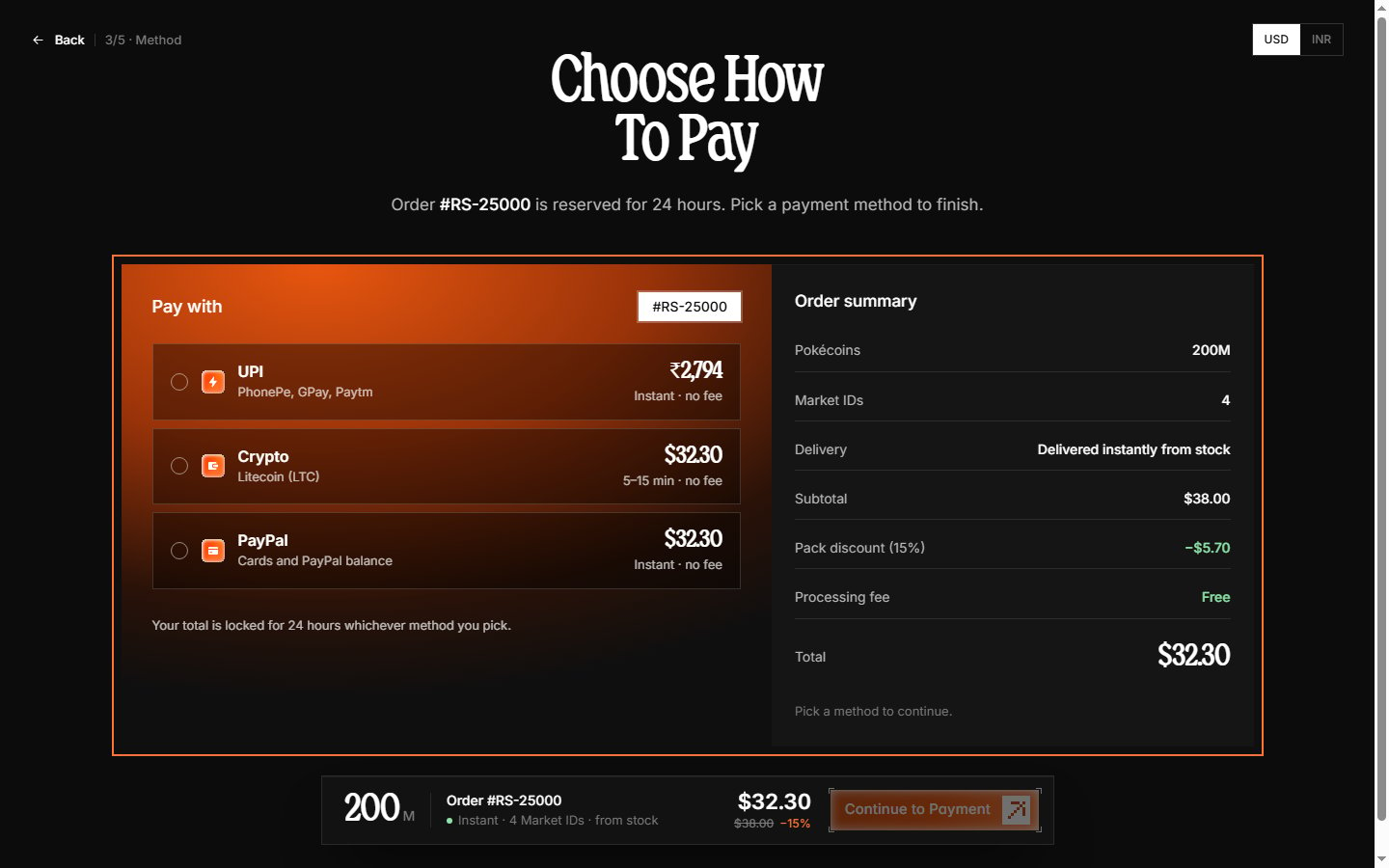
2
Open PayPal checkout
The payment step shows an embedded PayPal button. Clicking it opens PayPal’s secure checkout in a popup window — you never enter card details on our page.
3
Approve the payment
Log in to PayPal (or choose Pay with Debit or Credit Card to pay as a guest where available), review the amount, and approve.
4
Payment confirmed
When PayPal approves, the popup closes and your order page updates to paid within seconds — then continues to the confirmation screen automatically.
Supported funding sources
Through PayPal, you can pay using:- PayPal balance
- Linked debit cards
- Linked credit cards
- Linked bank accounts
Processing time
PayPal payments confirm instantly. Once you approve the payment, your order immediately moves to processing and delivery.Currency handling
PayPal orders are charged in USD. If your PayPal account uses a different currency, PayPal handles the conversion and shows the rate before you approve.PayPal fees
Radium Store charges no processing fee on PayPal — the total shown on the method card is what you pay. (PayPal itself may apply its own conversion or cross-border fees, which it displays before you approve.)Troubleshooting
Popup closed or payment not confirmed
Popup closed or payment not confirmed
If the PayPal popup was closed before approving, the payment simply never happened — pick the method again or a different one. If you paid but the page did not update, wait a minute; the page polls every few seconds. If it still shows unpaid, contact support on Discord with your PayPal transaction ID.
PayPal shows payment complete but order is pending
PayPal shows payment complete but order is pending
There may be a brief delay in payment notification. Wait 5-10 minutes and refresh your dashboard. If the order remains pending, contact support with your PayPal receipt.
Payment declined by PayPal
Payment declined by PayPal
PayPal may decline transactions for various reasons including suspected fraud, insufficient funds, or account limitations. Review your PayPal account status or try a different payment method. This is something on PayPal’s side — you would have to contact PayPal support or your card provider to resolve it.
Refunds
Refunds for PayPal payments are returned to your PayPal account. Processing time for refunds depends on PayPal but typically completes within 3-5 business days.Learn about card payments in Cards.