> ## Documentation Index
> Fetch the complete documentation index at: https://docs.radiumstore.org/llms.txt
> Use this file to discover all available pages before exploring further.
# Cryptocurrency
> Pay for your Pokécoins using Litecoin
Radium Store accepts **Litecoin (LTC)** as a cryptocurrency payment option, processed through NOWPayments. It provides a decentralized payment method that does not require traditional banking.
## Accepted cryptocurrency
We currently accept **Litecoin (LTC)** only — no other coins or networks.
Litecoin offers faster confirmation times compared to Bitcoin, making it well-suited for purchases where you want quicker processing.
## Requirements
To pay with crypto, you need:
* A cryptocurrency wallet with sufficient LTC balance
* The ability to send transactions on the Litecoin network
## How to pay with crypto
On the payment method step, choose **Crypto** — "Litecoin (LTC)". The card shows the USD total and notes that it auto-confirms in 5–15 minutes with no processing fee.
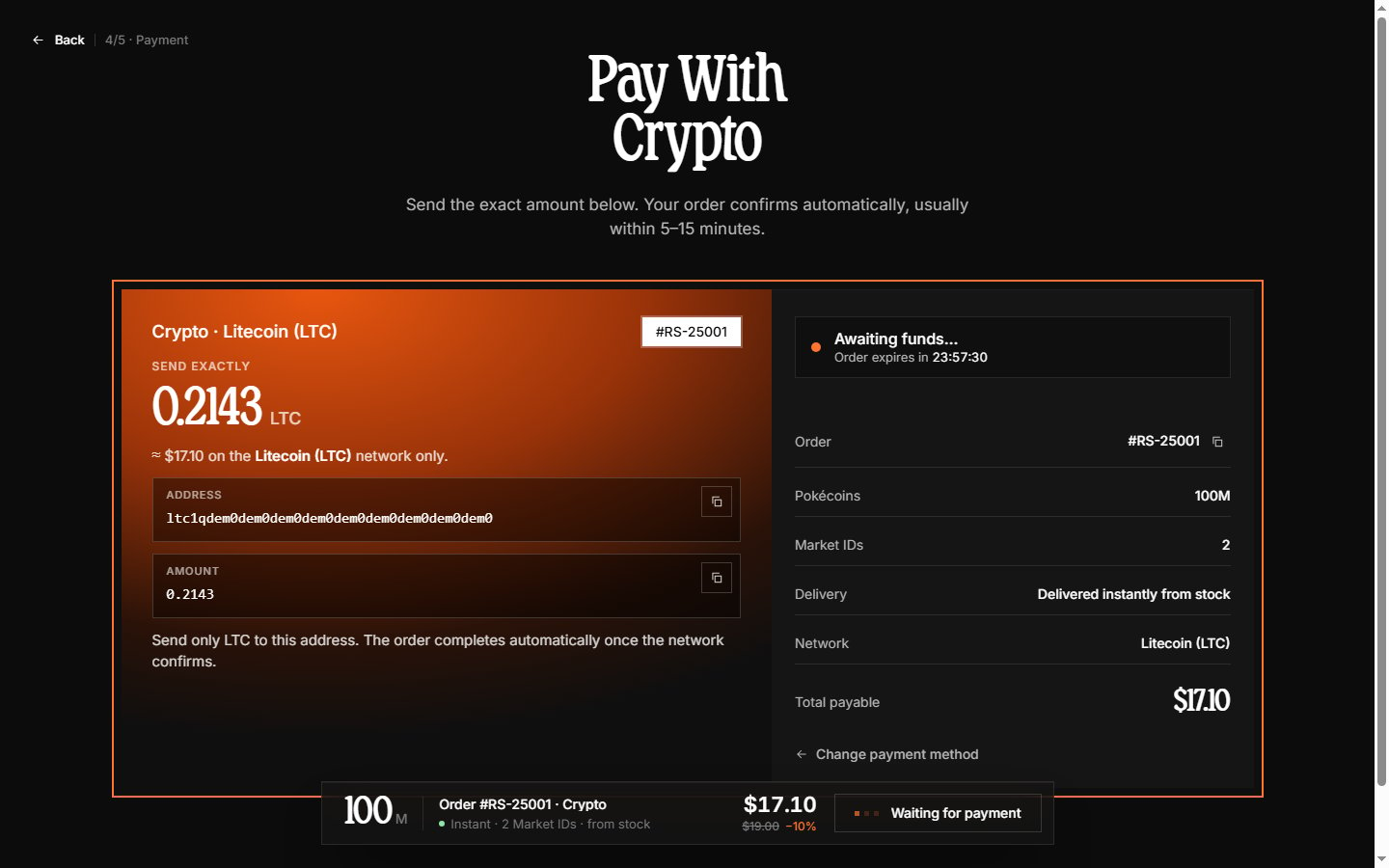
The payment page shows **"Send exactly X LTC"** with:
* The **wallet address** to send to (with a copy button)
* The **exact LTC amount** (with a copy button)
* A live status indicator and an order expiry timer
 From your cryptocurrency wallet:
1. Copy the wallet address
2. Paste the exact LTC amount displayed
3. Send the transaction on the Litecoin network
Send **only LTC** on the Litecoin network, and send the **exact** amount shown. The amount is calculated at the current exchange rate — sending a different amount or a different coin requires manual review and delays the order.
The page watches the blockchain for your payment — statuses like "Awaiting funds…", "Confirming on-chain…", and "Confirmed" update live. Litecoin payments typically confirm in about **5–15 minutes**.
Once the payment confirms, the page continues to the order confirmation screen automatically.
## Understanding confirmations
Blockchain transactions require confirmations before being considered final. Each confirmation represents a new block added to the blockchain after your transaction.
**Why confirmations matter**: Confirmations protect against double-spending and ensure the transaction cannot be reversed. More confirmations mean higher certainty that the payment is permanent.
**Confirmation times** vary based on:
* Network congestion
* Transaction fees you paid
* Block times for Litecoin
During high network congestion, confirmation times may be longer than usual.
## Payment window
Crypto payments are tracked on the payment page for up to **30 minutes** (the order itself is held for 24 hours). If your payment does not arrive in that window, contact support on [Discord](https://discord.gg/TfKV8Xeh2r) with your transaction hash — payments that land later are still matched to your order.
## Transaction fees
When sending cryptocurrency, you pay a network transaction fee to miners/validators. This fee is separate from your order total and is paid directly to the blockchain network — Radium Store adds no fee on top.
Higher transaction fees typically result in faster confirmation times. If you need quick confirmation, consider using a higher fee setting in your wallet.
## Troubleshooting
Transactions may take several minutes to appear on the blockchain depending on network conditions. If the payment page does not detect your transaction within 15 minutes, contact support with:
* Your transaction hash/ID
* The wallet address you sent to
* Your Radium Store order number
If you sent less than the required amount, the payment is flagged as partially paid and needs manual review — contact support with your transaction details to resolve it.
If you sent more than required, the excess amount is typically refunded after review.
If your transaction was sent before the window expired but confirms after, the payment should still be credited — contact support with your transaction hash if the order does not update.
If you did not send before expiry, start a new order.
Low transaction fees can result in slow confirmations during network congestion. Options include:
* Wait for the transaction to eventually confirm
* Contact support if the delay is causing issues with your order
If you sent cryptocurrency to an address other than the one displayed for your order, the payment cannot be recovered. Always verify the address before sending.
## Refunds
Refunds for Litecoin payments are returned in LTC to a wallet address you provide. Contact support to initiate a refund and provide your receiving Litecoin address.
Refund amounts are based on the original Litecoin amount, not the fiat value at the time of refund.
***
Learn about data security in [Data we collect](/data-collection).
From your cryptocurrency wallet:
1. Copy the wallet address
2. Paste the exact LTC amount displayed
3. Send the transaction on the Litecoin network
Send **only LTC** on the Litecoin network, and send the **exact** amount shown. The amount is calculated at the current exchange rate — sending a different amount or a different coin requires manual review and delays the order.
The page watches the blockchain for your payment — statuses like "Awaiting funds…", "Confirming on-chain…", and "Confirmed" update live. Litecoin payments typically confirm in about **5–15 minutes**.
Once the payment confirms, the page continues to the order confirmation screen automatically.
## Understanding confirmations
Blockchain transactions require confirmations before being considered final. Each confirmation represents a new block added to the blockchain after your transaction.
**Why confirmations matter**: Confirmations protect against double-spending and ensure the transaction cannot be reversed. More confirmations mean higher certainty that the payment is permanent.
**Confirmation times** vary based on:
* Network congestion
* Transaction fees you paid
* Block times for Litecoin
During high network congestion, confirmation times may be longer than usual.
## Payment window
Crypto payments are tracked on the payment page for up to **30 minutes** (the order itself is held for 24 hours). If your payment does not arrive in that window, contact support on [Discord](https://discord.gg/TfKV8Xeh2r) with your transaction hash — payments that land later are still matched to your order.
## Transaction fees
When sending cryptocurrency, you pay a network transaction fee to miners/validators. This fee is separate from your order total and is paid directly to the blockchain network — Radium Store adds no fee on top.
Higher transaction fees typically result in faster confirmation times. If you need quick confirmation, consider using a higher fee setting in your wallet.
## Troubleshooting
Transactions may take several minutes to appear on the blockchain depending on network conditions. If the payment page does not detect your transaction within 15 minutes, contact support with:
* Your transaction hash/ID
* The wallet address you sent to
* Your Radium Store order number
If you sent less than the required amount, the payment is flagged as partially paid and needs manual review — contact support with your transaction details to resolve it.
If you sent more than required, the excess amount is typically refunded after review.
If your transaction was sent before the window expired but confirms after, the payment should still be credited — contact support with your transaction hash if the order does not update.
If you did not send before expiry, start a new order.
Low transaction fees can result in slow confirmations during network congestion. Options include:
* Wait for the transaction to eventually confirm
* Contact support if the delay is causing issues with your order
If you sent cryptocurrency to an address other than the one displayed for your order, the payment cannot be recovered. Always verify the address before sending.
## Refunds
Refunds for Litecoin payments are returned in LTC to a wallet address you provide. Contact support to initiate a refund and provide your receiving Litecoin address.
Refund amounts are based on the original Litecoin amount, not the fiat value at the time of refund.
***
Learn about data security in [Data we collect](/data-collection).